How to Launch a Startup Brand for Under $25 a Month: Part 2 - Build Your Brand Kit and Claim Your Profiles

TL;DR. Part 1 built your site. Part 2 prepares the raw material every profile and directory will ask for, then puts it to work on the channels you own - and it is all free. First, build a brand kit: one sheet holding your name, handle, tagline, slogan, short and long descriptions, category, keywords, colors, and logo links, so you paste instead of rewrite. Then claim and complete your owned profiles - GitHub, X, LinkedIn, Facebook, YouTube, and TikTok - each one consistent, linked back to your domain, and wired into your sameAs. The running total stays about $25/month plus the domain. (Part 3 takes this kit to the wider web - the free directories to submit to - and shows how to track it all with the DataEase AI Brand Intelligence platform.) New here? Build the foundation in Part 1 first.
Why a brand kit comes before the profiles
In Part 1 you built the half of AI visibility you fully control: a canonical domain, a fast site, schema, and an llms.txt file. Part 2 begins the off-site half - and the natural instinct is to rush off and start creating profiles. Resist it for one hour, because the order matters.
Here is the trap. If you improvise your copy at each signup, you end up with a slightly different brand name on LinkedIn, a different one-liner on X, a stray handle on YouTube, and three versions of your description. To you that is trivia. To an AI answer engine it is noise: models disambiguate companies by matching consistent signals - the same name, handle, description, and domain - across many independent sources. When those signals agree, the model is confident the LinkedIn page, the X profile, and the product are one company. When they conflict, your identity fractures into several half-formed entities and the model trusts none of them.
The fix is to prepare once and reuse everywhere. You write every field a profile could ask for into a single brand kit, then paste from it. And because each profile you complete links back to your canonical domain, the set becomes the verified social signal in the 7-Signal AI Visibility Framework - and a sameAs anchor that ties every profile to the Organization schema your site already ships. None of it costs a cent. For the wider picture of which signals matter, see why your brand isn't mentioned in ChatGPT.
The running cost tracker (everything in Part 2 is free)
Same honest tally as Part 1. Building a kit and claiming profiles costs time, not money - the recurring stack is unchanged:
| Step | Item | Cost (USD) | Recurring? |
|---|---|---|---|
| 1-3 | Part 1 stack: domain + Cloudflare + GitHub Team + Claude Pro | ~$25/mo + domain | Carried over |
| 4 | Brand kit (one spreadsheet) | $0 | - |
| 5 | Owned profiles: GitHub, X, LinkedIn, Facebook, YouTube, TikTok | $0 | - |
| Running total after Part 2 | ~$25/mo + domain | ||
Step 4: Build your brand kit (a copy-paste sheet)
What it is: One spreadsheet that holds every piece of text and every asset a profile or directory will ever ask you for, written once. Google Sheets, Notion, or a plain doc all work - what matters is that every field is one copy-paste away.
Why it matters for GEO: Consistency is the whole game. An identical name, handle, description, and domain across every surface is what lets a model collapse a dozen scattered pages into one trusted entity. The kit is how you guarantee that consistency before you have created a single profile - and it saves you from rewriting your pitch twenty times.
What to put in it. Fill each field once, with the real values for your brand. Here is the full template, with examples for a fictional company, Acme:
| Field | What it's for | Example (acme.com) |
|---|---|---|
| Brand name | Used identically everywhere | Acme |
| Handle / username | The same @handle on every platform | @acmehq |
| Tagline | 2-4 words; the chip under your name | Invoicing on autopilot |
| Slogan | One memorable sentence | Get paid faster, with zero busywork |
| Short description | Bios and meta tags (~160 chars) | AI invoicing that drafts, sends, and chases invoices for freelancers - so you get paid faster. |
| Standard description | Directory listings (~50 words) | Acme is an AI invoicing tool for freelancers and small teams that drafts, sends, and follows up on invoices automatically. |
| Long description | About sections (~120-160 words) | Acme replaces manual invoicing with an AI assistant that creates branded invoices, schedules reminders, reconciles payments... |
| Category | Your product category | AI invoicing software |
| Keywords / tags | Comma-separated, for tag fields | AI invoicing, automated invoicing, freelancer invoicing, accounts receivable |
| Founded | Year founded | 2026 |
| Headquarters | City, region, country | Austin, TX, USA |
| Founders | Name + title | Dana Reed (CEO), Sam Cole (CTO) |
| Contact email | A public inbox | [email protected] |
| Canonical website | One URL, used everywhere | https://acme.com |
| Logo, avatar, cover | Square logo + avatar + a wide banner | Square PNG (512px+), avatar (400px+), wide cover |
| Brand colors | Primary + dark, as hex | #1F6FEB, #0B1F3A |
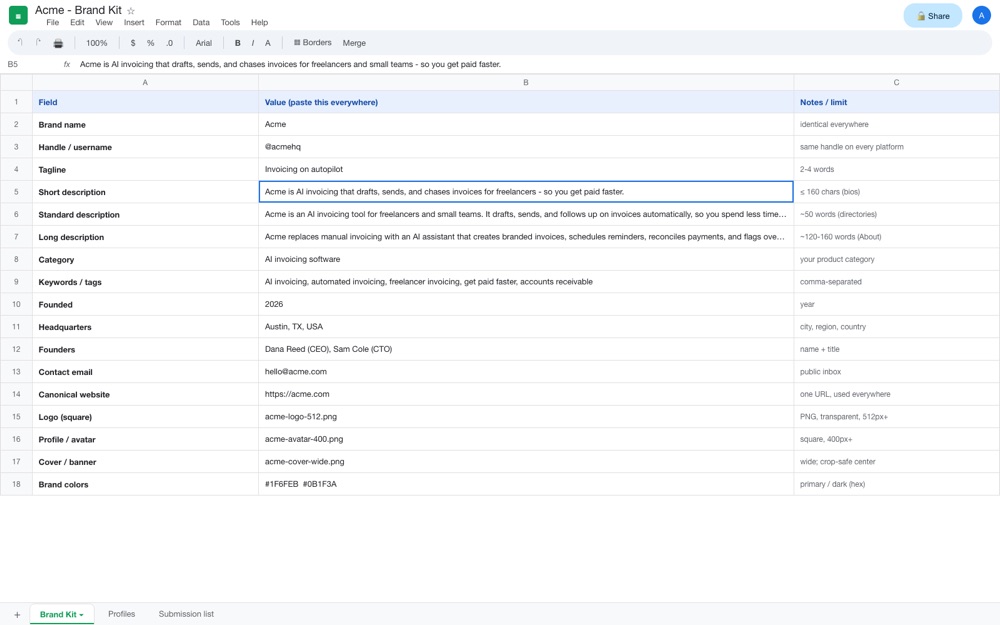
Tip: keep the kit as a living document. Add a tab for each profile with the exact text you used, and a "Submission list" tab you will fill in Part 3. The hour you spend here is repaid every single time you sign up for anything.
Cost: $0. Running total: ~$25/month + the domain (unchanged).
Step 5: Claim and complete your owned profiles
What it is: The profiles you fully control. For each one you claim the handle, fill every field straight from your brand kit, link back to your domain, and add the profile URL to your sameAs array.
Why it matters for GEO: These owned profiles are the verified-social half of your entity. Each is a high-authority page that AI models read, and together - all consistent, all pointing back to one domain - they are the strongest "this is who we are" signal you can ship for free. This is the corroboration layer you control; Part 3 adds the third-party corroboration you earn.
The profiles to claim, and what each one needs. Field limits and image sizes below are current at the time of writing; treat them as a guide, since platforms tweak them:
| Platform | Handle & name | Bio / About | Images | Don't forget |
|---|---|---|---|---|
| GitHub (organization) | Org @handle + display name | Short description + a profile README | Square logo | Website, location, verified domain, pinned repos - best if you ship code or dev tools |
| X (Twitter) | @handle (≤15 chars), name (≤50) | Bio ≤160 chars (your short description) | Avatar 400×400, header 1500×500 | Location, website link, a pinned post |
| LinkedIn (Company Page) | Page name | Tagline ≤120 chars; About ≤2,000 (long description) | Logo 300×300, cover 1128×191 | Website, Industry, Company size, HQ, Founded, Specialties |
| Facebook (Page) | Page name + @username | Intro ~101 chars; longer About | Profile 170×170, cover 851×315 | Category, website, a call-to-action button |
| YouTube (channel) | Channel name + @handle | Description ≤1,000 chars, with links | Avatar 800×800, banner 2560×1440 | Keep banner text centered; add at least one intro video |
| TikTok (business) | @username + name | Bio ≤80 chars | Square avatar | Switch to a free Business account to get a clickable website link |
A few platform notes worth calling out. On GitHub, you already created an organization in Part 1 - add the logo, description, website, and an organization profile README that pins your key repositories. On X, you do not need to pay for a badge; claiming the handle and filling the profile is free and is all the "verified social" signal requires. LinkedIn gives you the most room - use the full 2,000-character About for your long description and fill every detail field, because that structured data is exactly what gets read back. YouTube rewards even a single short explainer video. And if you are a local or service business, the optional Instagram business profile (150-character bio, one link) is worth adding too.
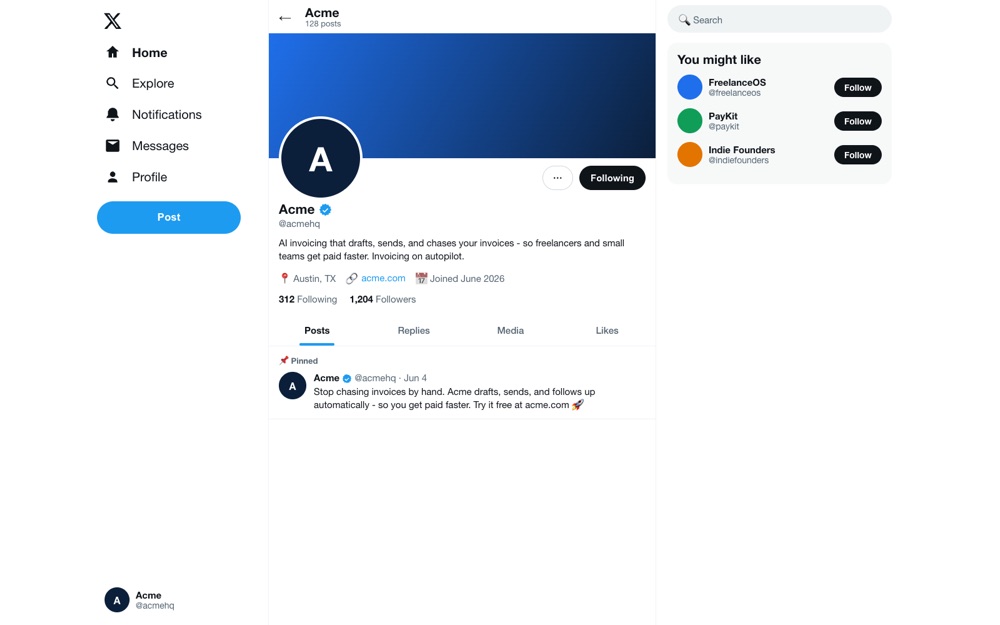
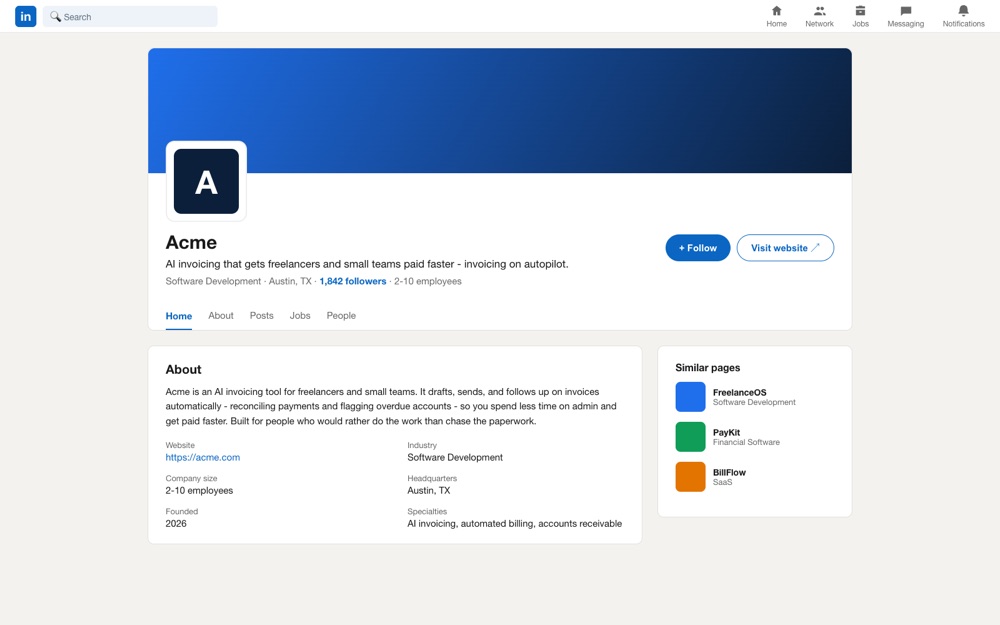
The consistency rules - apply them to every profile:
- Use the same handle, same name, and same descriptions everywhere - straight from the kit.
- Always link back to your canonical domain (the same
https://acme.com, never a variant). - Add each profile's public URL to the
sameAsarray in your homepageOrganizationJSON-LD, so your site and your profiles point at each other.
Cost: every profile, $0. Running total: ~$25/month + the domain (still unchanged).
Keep the sheet - it pays off twice
Your brand kit is not a one-time chore; it is the asset you reuse for the rest of the series. In Part 3 you will paste the very same fields into every directory and review site you submit to, so do not throw it away - keep it tidy, keep the per-platform tabs current, and you will move through dozens of submissions at copy-paste speed.
Watch the number move
You captured a day-one Brand Analyzer baseline in Part 1. Re-run the free scan now. As your new, consistent profiles get discovered and indexed, the verified social signal should begin to climb against that baseline - the first proof that your owned presence is taking shape. It rarely moves overnight, which is exactly why building the kit and the profiles early matters.
What you have after Part 2 (the running total)
For the same two subscriptions and one domain - no new spend - you have prepared your brand once and put it to work everywhere you control:
- A reusable brand kit - every name, description, tag, and asset in one sheet, ready to paste.
- A set of consistent owned profiles - GitHub, X, LinkedIn, Facebook, YouTube, TikTok - each completed from the kit and linked back to your domain.
- Those profiles wired into your
OrganizationsameAs, so your site and your social presence reinforce one entity.
| Step | Item | Cost (USD) | Recurring? |
|---|---|---|---|
| 1-3 | Part 1 stack: domain + Cloudflare + GitHub Team + Claude Pro | ~$25/mo + domain | Carried over |
| 4 | Brand kit (one spreadsheet) | $0 | - |
| 5 | Owned profiles: GitHub, X, LinkedIn, Facebook, YouTube, TikTok | $0 | - |
| Running total after Part 2 | ~$25/mo + domain | ||
Frequently asked questions
What is a brand kit and why build one before signing up anywhere?
A brand kit is a single sheet that holds every piece of text and every asset a profile or directory will ever ask you for - your name, handle, tagline, short and long descriptions, category, keywords, colors, and logo links. You write each field once and then paste it everywhere instead of improvising new copy at every signup. That is what keeps your brand identical across the web, which is exactly what AI engines rely on to recognize you as one entity. Building the kit first turns every profile setup that follows into a five-minute copy-paste job.
What should go in the brand kit?
At minimum: brand name, a consistent handle or username, a 2-4 word tagline, a one-line slogan, a short description of about 160 characters for bios, a standard description of about 50 words for directories, a long description of about 120-160 words for About sections, your category, a list of keywords, founded year, headquarters, founder names and titles, a public contact email, your canonical website URL, your logo and avatar and cover images, and your brand colors as hex codes. Keep it in a spreadsheet so every field is one copy-paste away.
Why does it matter that my name and description are identical everywhere?
Because AI answer engines disambiguate brands by matching consistent signals - the same name, the same handle, the same description, and the same domain - across many independent sources. When those signals agree, the model is confident your LinkedIn page, your X profile, and your product are all the same company. When they conflict, your identity is split across several half-formed entities and the model trusts none of them. Consistency is the single cheapest thing you can do to strengthen entity recognition.
Which profiles should I create first?
Start with the ones that carry the most weight and that every company can claim: a LinkedIn Company Page and an X profile, plus a GitHub organization if you ship code or developer tools. Then add YouTube, Facebook, and TikTok based on where your audience actually is. Claim the same handle on each, fill every field from your brand kit, link back to your canonical domain, and you have covered the verified-social signal. All of these profiles are free to create.
Do I need to pay for verification, like X Premium, for this to work?
No. The verified social signal here means a profile you have claimed, filled out consistently, and linked back to your domain - not a paid verification badge. Claiming a handle and completing a profile is free on every platform in this guide. One small exception worth knowing: TikTok only shows a clickable website link once you switch to a Business account, which is also free.
What is sameAs and how do my profiles connect to it?
sameAs is a property in the Organization schema your site already ships from Part 1. It holds an array of URLs that point to your brand's other official pages - your LinkedIn, X, GitHub, YouTube, and the rest. Add every profile you claim in this step to that sameAs array. Following those links from your verified domain to a verified profile and back is how a model confirms they all belong to one entity, so your owned profiles reinforce your site instead of floating alone.
What is the difference between Part 2 and Part 3?
Part 2 is about the presence you own and fully control - your brand kit and the profiles you create on platforms like LinkedIn, X, GitHub, YouTube, and TikTok. Part 3 is about the presence you earn off other people's sites: the free directories and review platforms to submit your brand to, getting indexed and measured in Google Search Console, Bing Webmaster Tools, and Google Analytics, and tracking how AI describes your brand over time with DataEase AI Brand Intelligence. Your brand kit feeds straight into Part 3.
Bottom line
The brands AI describes accurately are the ones that describe themselves consistently. Prepare your brand kit once - name, handle, tagline, slogan, descriptions, keywords, colors, and assets in a single sheet - then claim and complete the profiles you own, pasting the same values into GitHub, X, LinkedIn, Facebook, YouTube, and TikTok, and link every one back to your domain and into your sameAs. Do that and you have built the verified-social half of your entity, consistently, for $0 on top of the ~$25/month foundation. Re-run a free Brand Analyzer scan to watch it register, then come back for Part 3, where we take this kit to the wider web and start tracking the results.
How to cite this guide
DataEase AI. How to Launch a Startup Brand for Under $25 a Month: Part 2 - Build Your Brand Kit and Claim Your Profiles. DataEase AI Blog, June 6, 2026. https://blog.dataease.ai/launch-startup-brand-minimal-cost-part-2/. Methodology: the DataEase 7-Signal AI Visibility Framework, applied via Brand Analyzer (brands.dataease.ai). Related reading: Part 1 - Initial Setup, Why Isn't My Brand Mentioned in ChatGPT?, and What Is Brand Presence?
Coming up in this series
This is Part 2 of three. Part 1 built and deployed your site; Part 2 prepared your brand kit and your owned profiles. The finale lands on the usual weekly cadence:
Part 3 - Get listed, get found, and get tracked (next week). The capstone takes your brand kit to the wider web: the full, free list of directories and review sites to submit your brand to - the earned, third-party citations AI answer engines lean on most - getting indexed and measured in Google Search Console, Bing Webmaster Tools (the index behind ChatGPT search and Copilot), and Google Analytics, and finally moving from one-off audits to ongoing monitoring with the DataEase AI Brand Intelligence platform, which tracks how your brand is described across ChatGPT, Claude, Perplexity, and Gemini over time - so you can watch your citation share climb against the baseline you captured in Part 1.