How to Launch a Startup Brand for Under $25 a Month: Part 3 - Get Listed, Get Found, and Get Tracked

TL;DR. Part 1 built your site; Part 2 prepared your brand kit and claimed the profiles you own. Part 3 is the capstone - and it is all free. First, get indexed - verify your site in Google Search Console and Bing Webmaster Tools (the index behind ChatGPT search and Copilot) so search engines and AI assistants can retrieve you at all. Then submit your brand to directories: the earned, third-party listings that AI answer engines lean on most, with a full free list of 97 directories below, organized so you start with the highest-authority ones. Wire up Google Analytics 4 to measure what works. Finally, move from one-off audits to ongoing monitoring with DataEase AI Brand Intelligence. The running total stays about $25/month plus the domain. New here? Start with Part 1 and Part 2 first.
The half of AI visibility you can't fake
In Part 1 you built the presence you fully control - a canonical domain, a fast site, schema, and an llms.txt. In Part 2 you prepared a brand kit and completed the profiles you own. Both are necessary. Neither is sufficient on its own, because a model that only ever hears a brand describe itself stays skeptical.
This is the most important and least intuitive fact in the whole series: AI answer engines trust what other sites say about you far more than what you say about yourself. Research on generative engines finds that earned, third-party sources make up roughly 70-92% of the citations AI assistants use across categories - the lion's share over a brand's own pages (Chen et al., 2025). That is why this final part is about the presence you earn: independent directories that list you, search engines that index you, and a way to watch the result. For the full picture of which signals decide whether you get cited, see why your brand isn't mentioned in ChatGPT.
But none of that corroboration can be retrieved if your pages aren't in the index to begin with - so we start with the floor (Step 6: get indexed in Google and Bing), then move to the cheapest and most accessible form of third-party corroboration: getting your brand listed, consistently, on directories that already have authority (Step 7), which is where your brand kit finally pays off.
The running cost tracker (everything in Part 3 is free)
Same honest tally as before. Everything in Part 3 costs time, not money - the recurring stack is unchanged from Part 1:
| Step | Item | Cost (USD) | Recurring? |
|---|---|---|---|
| 1-5 | Parts 1-2: domain + Cloudflare + GitHub Team + Claude Pro + brand kit + owned profiles | ~$25/mo + domain | Carried over |
| 6 | Google Search Console + Bing Webmaster Tools | $0 | - |
| 7 | Directory submissions (free list of 97) | $0 | - |
| 8 | Google Analytics 4 | $0 | - |
| 9 | Brand Analyzer (free) / DataEase AI Brand Intelligence (optional) | $0 to start | - |
| Running total after Part 3 | ~$25/mo + domain | ||
Step 6: Get indexed in Google Search Console and Bing Webmaster Tools
What it is: Verifying your site with the two free webmaster tools, submitting your sitemap, and confirming your pages are indexed. This is how you tell search engines - and the AI assistants built on top of them - that your pages exist.
Why it matters for GEO and brand presence: A page that isn't indexed can't be retrieved, cited, or quoted - and it can't surface when a customer searches your name either. Both Google and Bing power AI surfaces, but Bing is the one founders forget: the Bing index is the search layer behind ChatGPT search and Microsoft Copilot, so being in Bing is a prerequisite for being retrieved by those assistants. For brand presence, indexing is what puts your own pages on the first results screen for your brand name - so you, not a competitor or a stale third-party listing, control the story people see first. Getting indexed in both is the floor for everything else in this series - which is why it comes first.
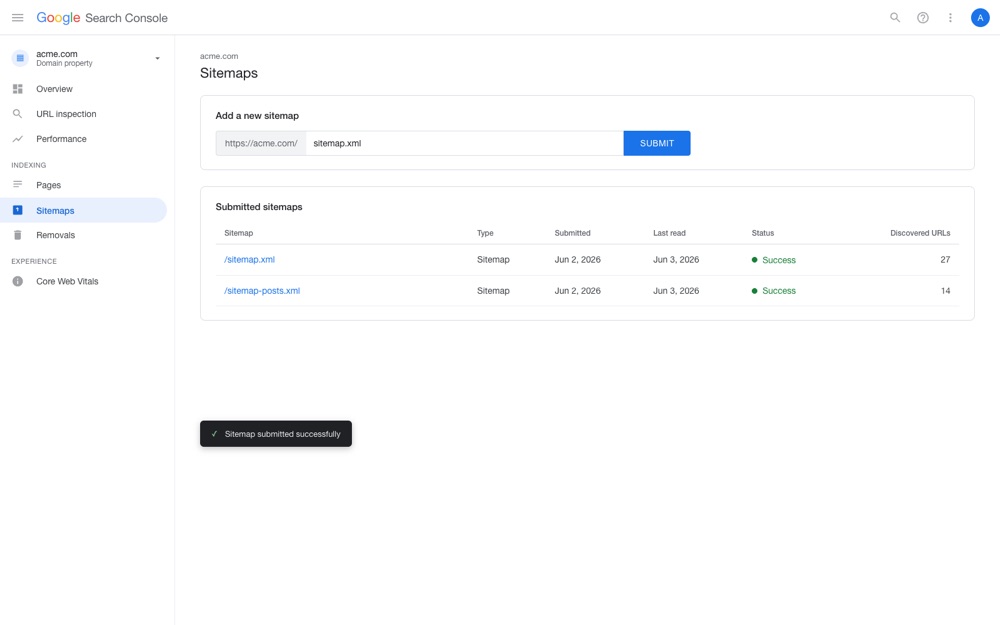
Google Search Console. Go to Search Console, add your domain as a property, and verify it - the cleanest method is a DNS TXT record, which is trivial since your DNS already lives on Cloudflare from Part 1. Then submit your sitemap.xml under Sitemaps. Within days you can watch pages move into the index and see the first queries you appear for.
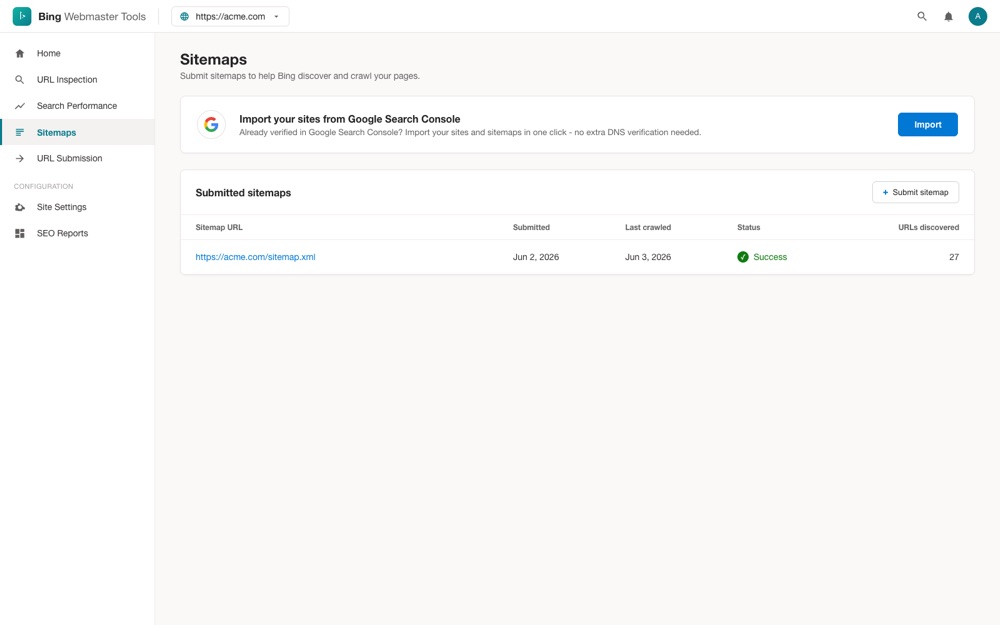
Bing Webmaster Tools. Go to Bing Webmaster Tools and choose Import from Google Search Console - it carries over your verified site and sitemap in a couple of clicks, so you barely re-enter anything. Confirm the sitemap is submitted and your pages are indexed. This single step is what makes your site eligible to appear in ChatGPT search and Copilot answers.
Cost: $0 for both. Running total: ~$25/month + the domain (unchanged).
Step 7: Submit to the free directories (your earned corroboration layer)
What it is: Listing your brand on independent directories and launch sites - each one an external page, on a domain you don't own, that states your name, category, and description. Below is a curated list of 97 directories that are free to submit to, grouped by type and sorted by authority.
Why it matters for GEO and brand presence: Each listing is a piece of third-party corroboration. When an independent, reasonably authoritative site says "Acme is an AI invoicing tool for freelancers" - in the exact words from your brand kit - it confirms the claim your own site makes. Stack enough of those consistent confirmations and a model moves from "this company says it does X" to "multiple independent sources agree this company does X." That shift is what earns you a confident mention. The same listings build brand presence with humans: each one is a real, browsable page where a prospect, investor, or journalist can discover and vet you, and a consistent name, category, and description across dozens of authoritative sites is what makes a young brand look established rather than brand-new. It is the same corroboration logic as your sameAs profiles from Part 2, now extended to domains you don't control.
How to prioritize (and how to read the tables)
Do not start at the bottom and grind upward. Work the list strategically:
- Authority first. Each table is sorted by Domain Rating (DR) - a 0-100 estimate of a domain's authority. A listing on a DR 70 directory corroborates you far more than one on a DR 10 site. Start at the top of each table.
- Relevance beats volume. Pick the tables that fit your product first - a SaaS or AI-tool directory describes you in context; a generic link list barely does. Then widen out. The What it is column gives a one-line description of each site so you can judge fit at a glance before you click through.
- Link type is secondary. The Link column shows whether a directory's outbound link is dofollow or nofollow. Dofollow is a minor SEO bonus, but this is not a backlink hunt - a consistent listing helps a model identify you whether the link is followed or not. Don't skip a relevant, high-authority directory just because it's nofollow.
- Paste, don't rewrite. Every field a directory asks for - name, handle, tagline, descriptions, category, keywords, logo - is already in the brand kit from Part 2. Keep it open in another tab and each submission is a five-minute copy-paste job. Use the tracker below to tick off what you've done, what's live, and what's still pending review.
Track it as you go
Free directory submission tracker
All 97 sites below, pre-filled with category, description, DR, and link type - plus columns to set status, log the date you submitted, and paste your live listing URL. Work it top-down within each category for an honest, sortable record of your corroboration layer.
- 97 sites pre-filled
- Status dropdown
- Date submitted
- Listing URL
- Sortable & filterable
One note on honesty: the DR and link-type values below are as listed in a public directory report and are current at the time of writing. Authority scores drift and sites change their rules, so treat the numbers as a guide for prioritizing, not as guarantees. We list only directories that are free to submit to; some also offer an optional paid upgrade for faster review, which you never need for the corroboration value.
Software & SaaS directories
The core group for most startups - directories built specifically to list software and SaaS products, where your category and description are read in context. Start here if you ship a tool, an app, or a SaaS.
| Directory | What it is | DR | Link |
|---|---|---|---|
| StackShare | Tech-stack community where teams list the tools they use | 79 | Nofollow |
| SaaSHub | SaaS discovery site with alternatives and reviews | 78 | Nofollow |
| SideProjectors | Marketplace for side projects and small startups | 69 | Dofollow |
| Sitelike.org | Finds and lists similar websites and alternatives | 66 | Nofollow |
| ShowMySites | Simple showcase directory for websites and apps | 66 | Nofollow |
| SaaS Browser | Curated browser of SaaS products by category | 66 | Nofollow |
| Startup Benchmarks | Lists startups alongside growth and metric benchmarks | 55 | Dofollow |
| Product Wing | Directory for launching and listing products | 55 | Dofollow |
| Unite List | General product and startup listing directory | 54 | Dofollow |
| My Launch Stash | Collection of launch and maker resources | 50 | Dofollow |
| Trustiner | Product listing and trust-signal directory | 48 | Dofollow |
| Million Dot Homepage | Pixel-style homepage listing for brands and sites | 48 | Dofollow |
| Best Tool Vault | Curated vault of software tools by use case | 48 | Dofollow |
| That App Show | Showcase directory for apps and indie products | 47 | Dofollow |
| Scout Forge | Scouts and lists newly released tools | 45 | Dofollow |
| VerifiedDR | Directory of sites with verified domain ratings | 43 | Dofollow |
| Viberank | Ranking and listing site for indie products | 42 | Dofollow |
| Makerlist.io | Listing of maker tools and products | 36 | Dofollow |
| CurateClick | Curated directory of useful websites and tools | 36 | Nofollow |
| MicroSaaS Directory | Directory focused on micro-SaaS products | 34 | Dofollow |
| SaaSCity Map | Visual map listing of SaaS products | 33 | Dofollow |
| Resource.fyi | Directory of resources and tools for builders | 32 | Dofollow |
| Find Your SaaS | Searchable directory to discover SaaS tools | 32 | Dofollow |
| Vibe Apps | Directory of vibe-coded and indie apps | 25 | Dofollow |
| IndieTools | Listing of tools built by indie makers | 24 | Dofollow |
| ProductHubX | Hub for listing and discovering products | 24 | Dofollow |
| LaunchLog | Log-style directory of product launches | 22 | Dofollow |
| Endors | Endorsement and product listing directory | 18 | Dofollow |
| TrustViews | Reviews and trust-listing directory | 18 | Dofollow |
AI tool directories
If your product is an AI tool, these directories describe you in exactly the right category - and AI-tool listings are themselves frequently cited when assistants are asked to recommend tools.
| Directory | What it is | DR | Link |
|---|---|---|---|
| MedSci AI | AI tools directory within a science research portal | 73 | Dofollow |
| Future Tools | Popular curated directory of AI tools | 70 | Dofollow |
| Acid Tools | Directory of AI and productivity tools | 64 | Dofollow |
| AI X Collection | Collection of AI tools across categories | 54 | Dofollow |
| AppaList | Listing of apps and AI tools | 50 | Dofollow |
| AI Toolz | Searchable AI tools directory | 47 | Dofollow |
| ProofStories | Showcases AI products with social proof | 42 | Nofollow |
| WhatTheAI | Directory of new and trending AI tools | 36 | Dofollow |
| Rank my AI | Ranking directory for AI products | 33 | Nofollow |
| LaunchBoosts | Launch-boost directory for AI and SaaS | 31 | Nofollow |
| Dynamite AI | Curated AI tools listing | 30 | Dofollow |
| AISuperHub | Hub directory for AI applications | 27 | Nofollow |
| Online AI Tools Directory | General directory of online AI tools | 24 | Dofollow |
| AI Tools Lister | Simple listing of AI tools | 18 | Nofollow |
| AIArt.Tools | Directory focused on AI art and image tools | 18 | Dofollow |
Launchpads & "show your launch" sites
Product Hunt-style sites where you post a launch and the community can upvote and discuss it. Great for a launch-day spike of attention and a fresh, dated mention of your brand. There are a lot of them - hit the higher-DR ones first and treat the rest as optional volume.
| Directory | What it is | DR | Link |
|---|---|---|---|
| PeerPush | Peer-driven launch and promotion community | 73 | Dofollow |
| TinyLaunch | Daily launch board for small products | 72 | Nofollow |
| Startups Lab | Launch and showcase board for startups | 57 | Nofollow |
| OpenHunts | Open Product Hunt-style launch platform | 57 | Dofollow |
| indiehunt | Launch board for indie makers | 55 | Nofollow |
| SmolLaunch | Launch site for small, scrappy products | 54 | Nofollow |
| Shipybara | Ship-and-share launch community | 53 | Dofollow |
| EarlyHunt | Early-stage product launch board | 53 | Nofollow |
| Better Launch | Launch platform for makers | 52 | Nofollow |
| Launch | AI-focused product launch board | 51 | Nofollow |
| ShinyLaunch | Showcase for newly launched products | 49 | Dofollow |
| What Launched Today | Daily feed of new product launches | 48 | Dofollow |
| Launch Llama Directory | Directory arm of the Launch Llama tool | 47 | Nofollow |
| WeekHack | Weekly hackathon-style launch showcase | 47 | Nofollow |
| Launch List | Directory of places to launch your product | 47 | Dofollow |
| ShipBoost | Launch-boost platform for shipped products | 39 | Nofollow |
| LaunchClash | Competitive product launch board | 38 | Dofollow |
| Launch Vault | Archive-style launch directory | 38 | Dofollow |
| launch.cab | Minimal product launch board | 37 | Nofollow |
| Open Launch | Open, community-run launch platform | 37 | Dofollow |
| Saaspa.ge | Single-page SaaS launch listings | 36 | Dofollow |
| Go Publicly | Build-in-public launch and update board | 33 | Dofollow |
| MakerHunt | Maker-focused launch community | 31 | Nofollow |
| aat.ee | Compact launch and listing board | 30 | Dofollow |
| Sidehunt | Launch board for side projects | 30 | Nofollow |
| Stellar Launch | Launch showcase for new products | 30 | Dofollow |
| HUNT0 | Product Hunt alternative launch board | 29 | Dofollow |
| ProductLaunchpad.app | Launchpad for new product releases | 29 | Dofollow |
| Noonlaunch | Scheduled daily product launches | 27 | Dofollow |
| Solo Launches | Launch board for solo founders | 26 | Dofollow |
| Forg | Quick launch and discovery board | 25 | Nofollow |
| Launchpad | General product launchpad | 25 | Dofollow |
| Product Launchify | Launch promotion directory | 25 | Dofollow |
| startuups | Startup listing and launch board | 22 | Dofollow |
| Product Launch | Brazilian product launch directory | 21 | Dofollow |
| JustGotFound | Discovery board for just-launched products | 21 | Dofollow |
| Launch01 | Early launch listing board | 17 | Dofollow |
General business directories
Broad, established directories that list any kind of business. Their authority tends to be high and their listings are long-lived, which makes them solid corroboration even though they aren't software-specific.
| Directory | What it is | DR | Link |
|---|---|---|---|
| Brownbook | Global business listing directory | 79 | Dofollow |
| Callupcontact | Worldwide business contact directory | 76 | Dofollow |
| Viesearch | Human-curated search and business directory | 73 | Dofollow |
| Link Centre | Established web and business link directory | 72 | Dofollow |
| ShipYardHQ | Directory for shipped products and businesses | 35 | Dofollow |
| Directory-Free | Free general-purpose web directory | 32 | Dofollow |
Communities & publishing platforms
These work a little differently: instead of submitting a listing, you publish a short page about your brand or add your URL. A genuinely useful post on a developer community like DEV carries real weight; the paste-and-note sites are lower-effort, lower-trust mentions - quick wins, but don't lead with them. Write something worth reading and link back to your canonical domain.
| Platform | What it is | DR | Link |
|---|---|---|---|
| DEV Community | Developer community for publishing articles | 90 | Dofollow |
| Telegraph | Telegram's minimalist publishing tool | 88 | Dofollow |
| HackMD | Collaborative markdown publishing platform | 83 | Dofollow |
| Rentry.co | Markdown paste-and-publish pages | 78 | Dofollow |
| Versily | Publishing and page-builder platform | 74 | Dofollow |
| Active Search Results | Search engine you can submit your URL to | 74 | Dofollow |
| Posteezy | Quick post-and-publish platform | 63 | Dofollow |
| BizMaker | Business publishing and listing platform | 61 | Dofollow |
| Make.rs | Maker publishing and profile platform | 43 | Dofollow |
| DesiFounder | Community and publishing site for founders | 22 | Dofollow |
Cost: $0 for every directory above. Running total: ~$25/month + the domain (unchanged).
Step 8: Measure what works with Google Analytics 4
What it is: A free Google Analytics 4 property on your site, with a couple of key events defined so you can see not just visits but what visitors actually do - sign-ups, demo requests, doc reads.
Why it matters: Indexing tells you that you can be found; analytics tells you whether being found is doing anything. As your directory listings and profiles get discovered, GA4 shows the referral traffic arriving and which actions it drives - so you learn which channels are worth more of your time. Mark the actions that matter as key events and you have a free, honest read on traction.
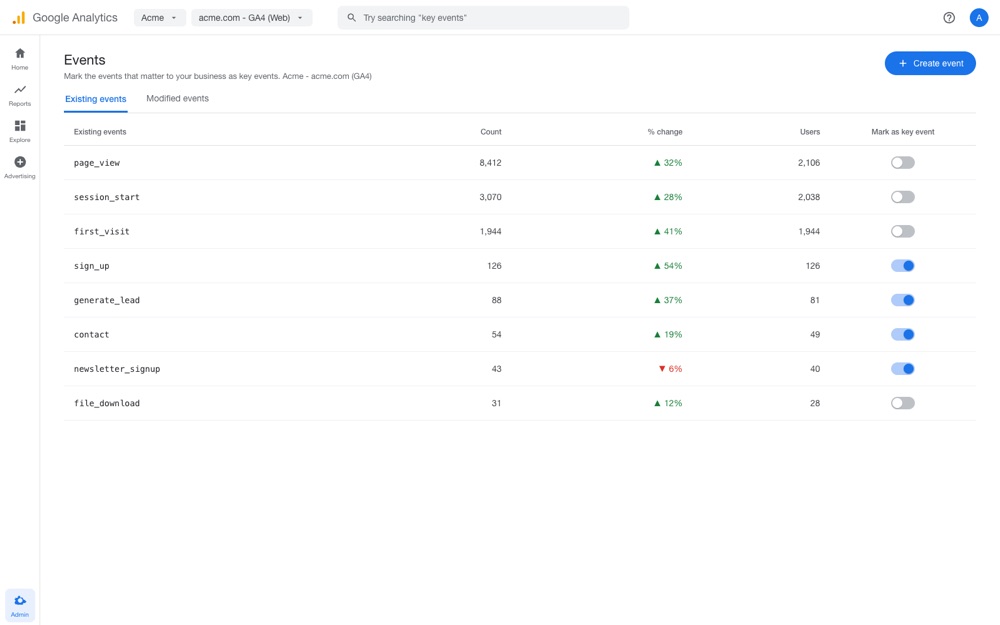
How to do it: Create a GA4 property, add the measurement ID to your site (your Part 1 scaffold already loads gtag.js - just drop in the ID), then in Admin → Events mark the actions that matter - a sign-up, a contact submit, an outbound click to your app - as key events. That's the whole setup.
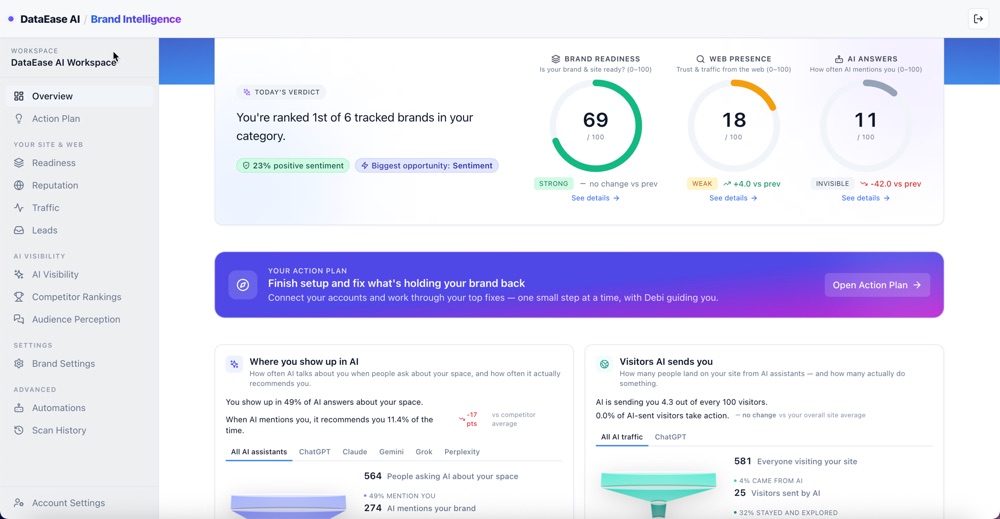
Where to go from here. GA4 tells you what's happening on your own site, but once the site, the owned profiles, the directory listings, and indexing are all feeding signals into the web, the harder question is what to do next to keep growing your brand presence. That's what DataEase AI Brand Intelligence is built for: it pulls every source you've connected into one bird's-eye view, then turns it into a prioritized list of jobs to be done - the specific moves that will most improve how AI engines find and describe you, ranked by impact. Work the top of the list first, and let the monitoring in the next step show whether it's moving the number.
Cost: $0. Running total: ~$25/month + the domain (unchanged).
Step 9: From one-off audits to ongoing monitoring
What it is: Moving from spot-checks to a trend line. Search Console and GA4 tell you about classic search and traffic; they say nothing about how ChatGPT, Claude, Perplexity, or Gemini actually describe and cite your brand. That is what AI-visibility monitoring is for.
Why it matters for GEO and brand presence: Everything you've built in this series - the site, the profiles, the listings - works by getting discovered, indexed, and corroborated, which happens gradually. A single audit can't tell you whether it's working; a trend can. Monitoring closes the loop: you see your citation share move, catch when an engine starts describing you wrong, and learn which of your efforts actually shifted the needle. For brand presence, that same watch is reputation insurance - the moment an assistant starts misstating your category, pricing, or positioning, you spot it and fix the source before the wrong story hardens across engines.
How to do it. Start free: re-run a Brand Analyzer scan and compare it to the baseline you captured in Part 1. When you want the trend instead of a snapshot, DataEase AI Brand Intelligence monitors how the major AI engines describe and cite your brand over time, tracks your share of citations against competitors, and surfaces what's moving the number - turning the one-off audits from earlier in the series into continuous feedback.
Cost: $0 to start with the free scan; ongoing monitoring is optional. Running total: ~$25/month + the domain (unchanged).
Watch the number move
You captured a day-one Brand Analyzer baseline in Part 1 and watched your owned profiles register in Part 2. Here is what to expect next: as your directory listings get crawled and your pages get indexed in Google and Bing, the earned signals - third-party citations and search authority - should start to climb against that baseline. This is the slowest signal to move and the most valuable when it does, because it is the corroboration AI engines weight most heavily.
What you have after the full series (the running total)
Three parts, two subscriptions, and one domain - no new spend in Parts 2 or 3. Here's the whole foundation you've built:
- Part 1 - the presence you control: a canonical domain on Cloudflare, a fast GEO/AEO-optimized site and blog built by an AI agent, schema, and an
llms.txt. - Part 2 - the presence you own: a reusable brand kit and consistent, completed profiles on GitHub, X, LinkedIn, Facebook, YouTube, and TikTok, all wired into your
sameAs. - Part 3 - the presence you earn and measure: indexing in Google Search Console and Bing Webmaster Tools, consistent listings across free directories, GA4 for traction, and AI-visibility monitoring to watch it all compound.
| Step | Item | Cost (USD) | Recurring? |
|---|---|---|---|
| 1 | Domain registration | $10-15/yr | Yearly |
| 1 | Cloudflare (DNS, SSL, CDN, Pages) | $0 | - |
| 2 | GitHub Team (private repo) | $4/user/mo | Monthly |
| 3 | Claude Pro + Claude Code (AI builder) | $20/mo | Monthly |
| 4-5 | Brand kit + owned profiles | $0 | - |
| 6-9 | Directories + Search Console + Bing + GA4 + monitoring | $0 to start | - |
| Running total for the whole series | ~$25/mo + domain | ||
Frequently asked questions
Why submit to directories if real customers rarely browse them?
Because the audience that matters most here is not human - it is the AI answer engines reading the web to decide what to say about you. Research on generative engines finds that earned, third-party sources account for roughly 70-92% of the citations AI assistants use, far more than a brand's own site. A consistent listing on an independent directory is corroboration: another domain confirming that your name, category, and description match what your own site claims. You are not chasing directory traffic; you are giving models more trustworthy places to verify who you are.
Do dofollow versus nofollow links matter for AI visibility?
Less than you would think. This is not a backlink-building exercise, so do not skip a relevant, high-authority directory just because its links are nofollow. What matters most is entity corroboration - an independent page that states your brand name, category, and description consistently with your site. A dofollow link is a small bonus for classic SEO, which is why we show it as a secondary column, but a consistent listing on a nofollow directory still strengthens how confidently an AI model can identify you. Prioritize authority and relevance first, link type second.
How many directories should I submit to, and how do I prioritize?
Start with the highest Domain Rating directories that actually fit your product, then work down the list in batches. The first dozen high-authority, relevant listings do most of the work; the long tail adds incremental coverage. Prioritize directories whose category matches what you do - a SaaS or AI-tool directory over a generic link list - and lead with the ones in the higher tiers. Because every field comes straight from the brand kit you built in Part 2, each submission is a five-minute copy-paste job, so you can clear many in a single sitting.
Are these directories actually free?
Yes. Every directory listed in this guide is free to submit to at the time of writing - we filtered out the paid and pay-to-skip-the-queue options. Some free directories also sell an optional paid upgrade for faster review or a featured spot; you never need it for the corroboration value we are after. The Domain Rating and link-type values are as listed in a public directory report and current at the time of writing - treat them as a guide, since they shift over time.
Why set up both Google Search Console and Bing Webmaster Tools?
Google Search Console gets your sitemap in front of Google and shows which pages are indexed and what queries you appear for. Bing Webmaster Tools matters for a reason that is easy to miss: the Bing index is the search layer behind ChatGPT search and Microsoft Copilot, so being indexed in Bing is a prerequisite for being retrieved by those assistants. Both are free, both take minutes once your site is live, and Bing lets you import everything from Search Console so you barely re-enter anything.
Do I need a paid tool to track how AI describes my brand?
No tool is required to start. You can re-run the free Brand Analyzer scan to spot-check your score against the baseline you captured in Part 1. The difference is cadence: a free scan is a snapshot, while a monitoring platform like DataEase AI Brand Intelligence tracks how ChatGPT, Claude, Perplexity, and Gemini describe and cite your brand over time, so you can see the trend as your new profiles and listings get discovered. Start free, and add ongoing monitoring when you want the trend line rather than a single reading.
What is the difference between Brand Analyzer and DataEase AI Brand Intelligence?
Brand Analyzer is a free, on-demand audit - you enter a domain and get a snapshot score across the 7-Signal AI Visibility Framework, which is perfect for baselines and quick checks. DataEase AI Brand Intelligence is the ongoing platform: it monitors how AI engines actually describe and cite your brand over time, tracks your share of citations against competitors, and surfaces what is moving the number. Use Brand Analyzer to measure where you stand today; use Brand Intelligence to watch it change as the work from this series compounds.
Bottom line
The brands AI describes accurately are the ones the rest of the web agrees on. After building the site you control and the profiles you own, the final move is to get found, earn corroboration, and measure it: get indexed in Google Search Console and Bing Webmaster Tools so search and AI assistants can retrieve you, submit your brand - in the exact words from your kit - to the free directories that fit your product, wire up GA4 to see what works, and track how AI engines describe you over time. None of it adds to the ~$25/month foundation. Re-run a free Brand Analyzer scan to watch the earned signals climb, and when you want the trend rather than a snapshot, let DataEase AI Brand Intelligence keep watch for you.
How to cite this guide
DataEase AI. How to Launch a Startup Brand for Under $25 a Month: Part 3 - Get Listed, Get Found, and Get Tracked. DataEase AI Blog, June 13, 2026. https://blog.dataease.ai/launch-startup-brand-minimal-cost-part-3/. Methodology: the DataEase 7-Signal AI Visibility Framework, applied via Brand Analyzer (brands.dataease.ai). The finding that earned, third-party sources account for roughly 70-92% of AI citations is from Chen et al., 2025 (arXiv:2509.08919). Related reading: Part 1 - Initial Setup, Part 2 - Brand Kit and Profiles, Why Isn't My Brand Mentioned in ChatGPT?, and What Is Brand Presence?
The series, start to finish
This is the finale of a three-part series on launching an AI-visible brand for about $25/month:
- Part 1 - Initial Setup. Domain, Cloudflare, a private GitHub repo, and a GEO/AEO-optimized site an AI agent builds and Cloudflare Pages hosts.
- Part 2 - Brand Kit and Profiles. A reusable brand kit, then consistent owned profiles on GitHub, X, LinkedIn, Facebook, YouTube, and TikTok.
- Part 3 - Get Listed, Get Found, and Get Tracked. Indexing in Search Console and Bing, free directory submissions, GA4, and ongoing AI-visibility monitoring.
Build it in order, keep the cost honest, and you have a brand that ChatGPT, Claude, Perplexity, and Google's AI Overviews can find, understand, and trust - for the price of a domain and two small subscriptions.